XCPE: is your Android TV box part of the botnet, and how to switch it off
By Steven Lim, founder · Updated 2026-11-08 · CodaMinds, Kuala Lumpur
TL;DR The one-minute version
What happened
Google says a TV-box maker, Videostrong, built a backdoor called XCPE into its boxes. It enrolled more than 1.3 million of them in a botnet. Google took the network down on 2 November 2026 and banned the maker.
Am I affected?
Maybe, if you have a MECOOL or an unbranded "unlocked" or free-channel Android box. Open the box's app list and look for x.cpe or com.oemservice.
What to do now
Use our free XCPE Cleaner. Install it once on the box, press Scan, then Remove threats, and it checks the box again after every restart. Rather not install anything? Do the three steps in Settings. If the names come back after a restart, unplug the box from the internet and replace it, as the researchers advise.
XCPE is a backdoor that sits inside the box's own system software, the firmware, and runs with full system rights. You never installed it, so ordinary virus checks miss it. Google's threat team traced it to the box maker itself.
Once a box is online, the people behind it can:
install apps silently and run any command on the box
take screenshots and type on the box as if they held the remote
rent out your home internet to strangers as a "residential proxy", so their traffic comes from your address
switch off Google Play Protect, the box's built-in app scanner, so nothing warns you
Why a factory reset does not fix it. A small starter copy lives in a part of the box a reset never touches. At every start-up it reinstalls the full backdoor. Since August 2026, newer versions also arrive under names that look like normal Android parts, such as com.android.system.ntp and com.android.sso.auth.handler.
Am I affected?
The box
A MECOOL box, or a no-name box sold as "unlocked", "fully loaded" or "free channels". Many white-label brands use the same maker. Settings > About shows the brand and model.
The warning sign
Play Protect is switched off and you did not do it. XCPE sets this itself.
The proof
One of these names is in the app list with system apps shown:
These names come from Google's indicator list and Synthient's research. Synthient also published a list of 182 model names seen in the campaign, by McAfee's count. A matching model is a strong warning sign, not proof. One of these packages being active is.
Fix it in 3 steps, nothing to install
This takes about as long as making a coffee, using only the remote.
1
Find it
Settings > Apps > See all apps > scroll to the bottom > Show system apps. Look for x.cpe, com.oemservice, com.abc.nexus, com.android.system.ntp and com.android.sso.auth.handler.
2
Switch it off
Open each one. Press Force stop, then Uninstall if it is offered. If it is not, press Uninstall updates and then Disable. Restart the box.
3
Turn the scanner back on
Play Store > your profile > Play Protect > gear > switch on Scan apps with Play Protect. Then repeat step 1. If a name is active again, the firmware is putting it back: unplug the box from the network and replace it.
Then protect your accounts. Change the passwords you ever typed on the box, such as Google, Netflix or YouTube, and switch on 2-step verification. In your Google account, under Security > Your devices, sign the box out.
Your options, compared
All three are free. We recommend our XCPE Cleaner because it uninstalls rather than switches off, and removes anything the firmware brings back after every restart. The 3 steps and XCPE Guard are fair choices too.
Feature
The 3 steps above
XCPE Guard community app, open source
CodaMinds XCPE Cleaner Ours · recommended
Needs a computer
No
No
No
Installs on the box
Nothing
One app, about 11 MB (release 1.0.4)
One app, under 1 MB
Finds renamed copies
Only the names you look for
Yes
Yes
Removes or switches off
Disables system copies
Switches off, can be undone
Uninstalls for the user
Checks again after restart
You repeat step 1
After boot and daily
After every restart
Turns Play Protect back on
Yes, by hand
Yes
Yes
When the firmware puts it back
Comes back
Switches it off again
Removes it again; deep clean on rooted boxes
Debugging after it finishes
Never switched on
Switched off after every scan
Stays on for restart checks; an opt-in button tests, then switches it off
"Uninstalls for the user" removes the app's data and its start-up hook, so it no longer runs. On every route, the firmware's spare copy stays on the box as inert files unless the box is rooted. If a package is active again after a restart, the firmware restored it, and the honest advice is to replace the box. XCPE Guard's details come from its own published description and release page.
The CodaMinds fix, free and open source
We wrote a small app so a non-technical owner can do this safely. It shows a plain-language report before it changes anything. It is free and open source (MIT licence): source code and releases on GitHub.
Recommended · on the box
XCPE Cleaner app
No computer needed. Version 1.0, for Android 5.0 and newer. It is not in the Play Store, so you install it yourself:
Install the free Downloader app from the Play Store, open it and type the full address https://codaminds.com/xcpe.apk, including https://, so nobody on your network can swap the file on the way. Allow the install when the TV asks.
Switch on debugging: Settings > About, press Build number seven times, then Developer options > USB debugging (and Network debugging if you see it). The app opens that page for you if needed.
Open XCPE Cleaner and press Scan, then Remove threats. When the TV asks "Allow USB debugging?", tick Always allow and press Allow.
removes the confirmed XCPE parts for the user without asking, and looks inside every installed app for XCPE's published component names, so renamed copies are caught
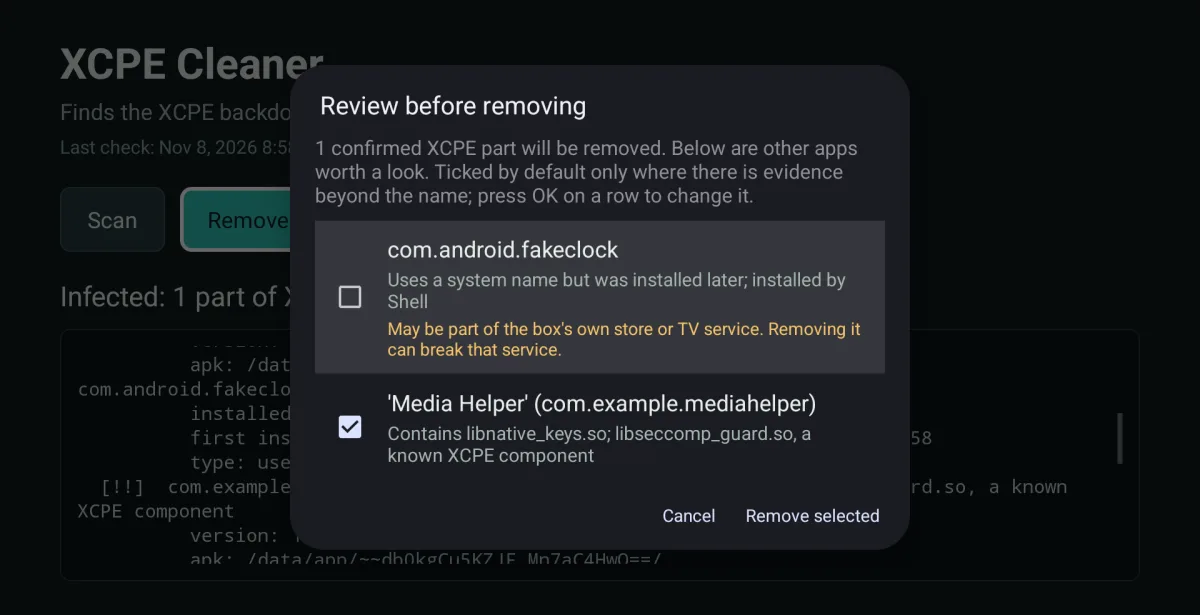
shows anything else on a review list first, with the reason for each app. Only apps with evidence beyond their name are ticked, so the box's own store and TV helpers are not removed by mistake
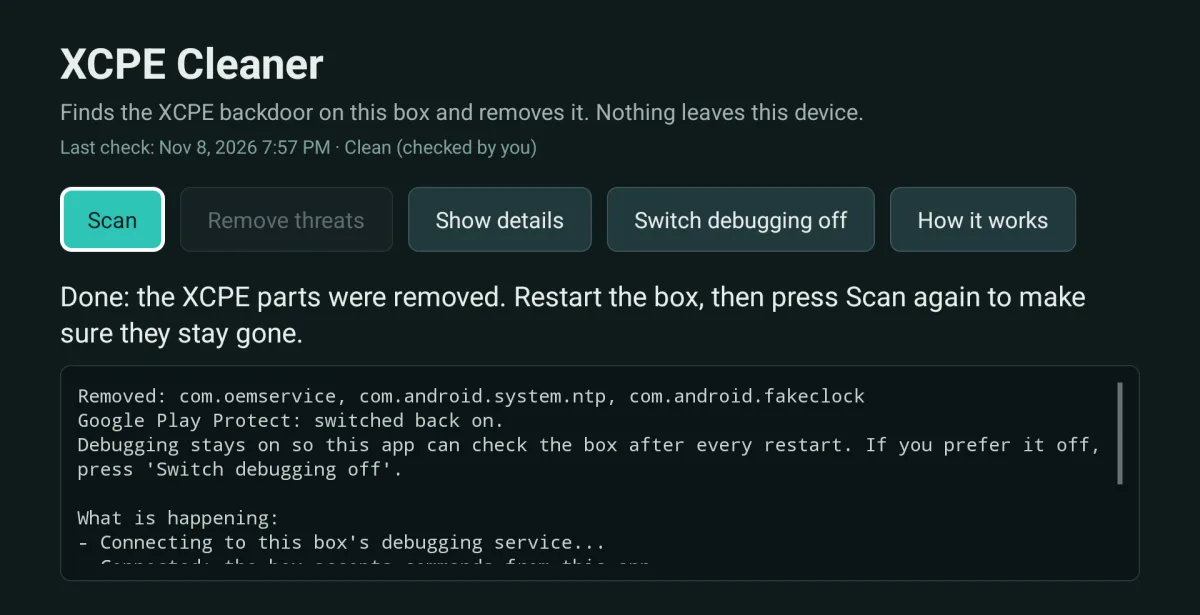
turns Play Protect back on
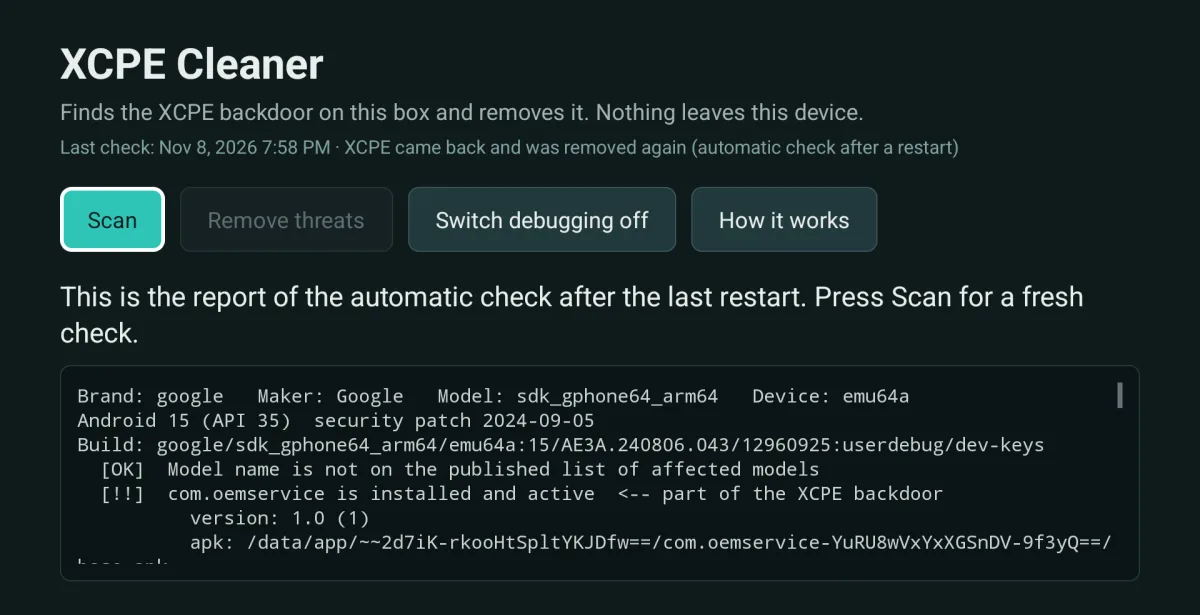
a boot guard removes anything the firmware brings back after each restart
on rooted boxes, Deep clean deletes the spare copy after checking the app name inside it; without root that copy stays switched off
follows the box's language: 18 languages, including 中文 and Bahasa Melayu
Newer Google TV boxes that only offer "Wireless debugging" get a guided mode: the app opens each package's App info page with Uninstall or Disable ready to press.
Debugging stays on after a clean-up, so the app can check the box after every restart. Press Switch debugging off to close it: the app first tests that the box can reopen it for those checks, and only then switches it off.
Signed by CN=CodaMinds XCPE Cleaner, O=CodaMinds, C=MY, certificate SHA-256 560d70b73c1f9fa92aca7a5e7165b76ae14035b4a57415227d938953e7c47848. Every genuine update carries this same signature; Android refuses to install an update over this app that was signed by anyone else. The same file and both fingerprints are on the GitHub release, so you can check them in a second place.
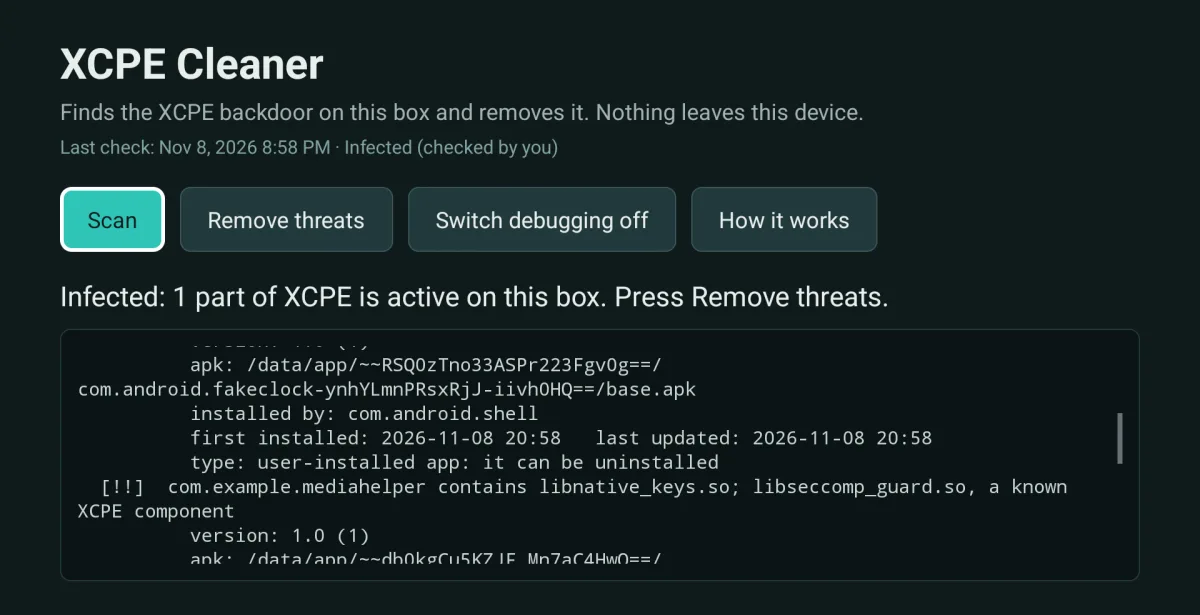
Scan. The report names each XCPE part, including one hidden inside another app.Review. Anything beyond confirmed XCPE parts is listed with its reason before removal.Remove. Removed, Play Protect back on, and what stays switched on.After a restart. XCPE came back and the app removed it again by itself.
Screens from our test on the Android 15 emulator with planted XCPE packages, shown as captured.
Tested on the Android 15 emulator with planted XCPE packages, not yet on a real infected box. We also scanned one real box: it was not infected, and its maker's own helper apps were correctly left alone. If the app reports the backdoor back after a restart, believe it and replace the box.
Questions
Does a factory reset remove XCPE?
No. The starter copy lives in a part of the box a reset does not erase, and it reinstalls the backdoor at the next start-up. Switching the packages off helps, but researchers disagree on whether any home fix is enough. McAfee reports that Synthient advises throwing these boxes away, and TrendAI says cleanup needs the maker, platform protection or a new device.
My box says Google TV or Android TV certified. Am I safe?
Probably, but check. Google says the maker hid the backdoor from its certification tests by loading it after the first start-up, and it has since banned the maker. Look at the brand in Settings > About and do step 1. It takes a minute.
Will anything stop working after I remove it?
Some maker apps may stop, such as its own update service or bundled player apps, because some of them read settings from the backdoor. Apps from the Play Store, such as Netflix and YouTube, should keep working. The box may stop getting the maker's updates, which on these boxes is a good thing.
What about my passwords?
Assume anything typed on the box could have been seen, because the backdoor can take screenshots. Change those passwords from your phone or computer, switch on 2-step verification, and sign the box out of your Google account.
Is the box safe if I keep it off the internet?
Offline, the backdoor cannot reach the people behind it. It also cannot stream anything, so for most people the real fix is a new box from a reputable maker. Ask the seller about a return or refund, and recycle the old box as electronic waste rather than passing it on.
Is CodaMinds part of Google or the researchers?
No. We are an independent studio in Kuala Lumpur that builds apps and systems. We wrote the XCPE Cleaner from the published research and give it away free.
Hotels, shops and offices often run a row of these boxes. Tap WhatsApp and tell us what you have, in English, 中文 or Bahasa Melayu. We also build apps and systems for businesses, and this app is a small example of how we work.